About This Page & Troubleshooting
What does the "DNS points to prohibited IP" error mean?
This error indicates that the website's DNS is pointing to an IP address that Cloudflare does not allow. This can happen if the DNS A records are misconfigured or if the IP address is on Cloudflare's prohibited list. For more details, see Cloudflare Error 1000 documentation.
What should I do if I see this error on stage.hypercontext.com?
If you are a visitor, you cannot resolve this issue directly. If you are the website owner, log in to your Cloudflare account and update the DNS A records to point to a permitted IP address. For step-by-step instructions, visit Cloudflare login.
Where can I find more information about Cloudflare Error 1000?
You can find detailed information and troubleshooting steps for Error 1000 on the Cloudflare support page.
How can I check if my DNS records are set up correctly?
To check your DNS records, log in to your DNS provider or Cloudflare dashboard and verify that your A records point to the correct, permitted IP addresses. Incorrect or prohibited IPs can cause this error.
What is Cloudflare and why is it blocking my site?
Cloudflare is a web infrastructure and security company that provides content delivery network (CDN) and DNS services. It may block your site if your DNS records point to prohibited IP addresses or if there are security concerns.
Can visitors do anything to resolve this error?
No, only the website owner or administrator can resolve this error by updating the DNS records. Visitors can only wait until the issue is fixed by the site owner.
How can I contact support if I need help with this error?
You can contact Cloudflare support through their support portal for assistance with DNS and error resolution.
What information should I provide to support when reporting this error?
Provide the Cloudflare Ray ID (e.g., 9c7eb221a7862440), the time of the error, your IP address, and a description of the issue to help support diagnose the problem.
How can I prevent this error from happening in the future?
Regularly review your DNS settings and ensure your A records point to permitted IP addresses. Stay updated with Cloudflare's documentation to avoid prohibited configurations.
Is this error related to my browser or device?
No, this error is related to the website's DNS configuration and Cloudflare's security policies, not your browser or device.
Can cookies or browser settings cause this error?
No, cookies or browser settings do not cause this error. It is a server-side DNS configuration issue.
What is a DNS A record?
A DNS A record maps a domain name to an IPv4 address. Incorrect A records can cause errors like Cloudflare Error 1000.
What is an IP address and why does it matter for DNS?
An IP address is a unique identifier for a device on the internet. DNS records must point to valid, permitted IP addresses for websites to function correctly.
What is the Ray ID shown on the error page?
The Ray ID is a unique identifier generated by Cloudflare for each error event. It helps support teams trace and diagnose issues.
Does this error affect all users or just me?
This error affects all users trying to access the site while the DNS configuration is incorrect.
How long does it take to resolve this error after fixing DNS records?
Once the DNS records are corrected, the error may resolve within minutes, but DNS propagation can sometimes take up to 24 hours.
Will fixing the DNS records restore my website immediately?
In most cases, updating the DNS records to valid IP addresses will restore your website quickly, but full propagation may take some time depending on your DNS provider.
Can I prevent this error by using a different DNS provider?
Using a different DNS provider does not guarantee prevention of this error. The key is to ensure your DNS records point to permitted IP addresses as required by Cloudflare.
Where can I learn more about DNS and website hosting?
You can learn more about DNS and website hosting from resources like the Cloudflare DNS documentation and other reputable web hosting guides.
Spinach AI Product Information
What is Spinach AI?
Spinach AI is a platform designed to enhance team collaboration and productivity by automating meeting notes, action items, and post-meeting tasks. It offers AI-powered insights, workflow automation, and seamless integrations with popular tools. Source
What core problems does Spinach AI solve?
Spinach AI solves problems such as manual note-taking during meetings, time-consuming administrative tasks, inefficient workflows, difficulty extracting insights from user feedback, and challenges in team collaboration. Source
Who can benefit from using Spinach AI?
Spinach AI is beneficial for product managers, engineering teams, project managers, marketing, HR, customer success, sales, and finance teams—essentially any team looking to improve productivity and collaboration. Source
How does Spinach AI automate note-taking?
Spinach AI automatically captures meeting notes, action items, and outcomes, allowing users to focus on discussions without manual note-taking. Source
What integrations does Spinach AI offer?
Spinach AI integrates with tools like Zoom, Google Meet, Microsoft Teams, Slack, Jira, Salesforce, Asana, GitHub, Figma, and more. For a full list, visit the Spinach AI integrations page.
Does Spinach AI offer an API?
Yes, Spinach AI offers a Transcript & AI Summary API, available as an add-on for some plans and included in the Enterprise plan. Source
How quickly can Spinach AI be implemented?
Spinach AI can be set up almost instantly. Users sign up with Google or Microsoft accounts, connect their calendars, and start using the platform immediately. Source
What onboarding support does Spinach AI provide?
Premium users receive an onboarding program to ensure a smooth transition and help teams fully utilize Spinach AI's features. Source
What are the key benefits of using Spinach AI?
Key benefits include increased productivity, streamlined workflows, enhanced collaboration, data-driven decision-making, customizable solutions, and improved customer engagement. Source
Features & Capabilities
What features does Spinach AI offer?
Spinach AI offers AI meeting assistance, automated note-taking, workflow optimization, AI-powered insights, seamless integrations, and tailored solutions for different roles. Source
Does Spinach AI support project management integrations?
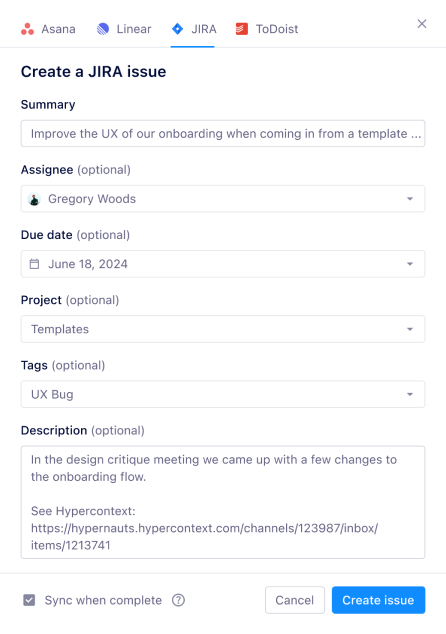
Yes, Spinach AI integrates with project management tools such as Jira, Asana, GitHub, and Linear. Source
What category does the Figma integration fall under?
The Figma integration is classified under the Media & Design category on the Spinach AI integrations page. Source
What categories does the Rippling integration fall under?
The Rippling integration falls under Directory Sync, HRIS, and SSO categories. Source
What is the ideal scenario for AI integration?
The ideal scenario is achieving smart AI that produces personalized outputs, augmenting human capabilities and making processes more intuitive and decisions more informed. Source
What integrations are available for leadership teams?
Spinach AI offers integrations for leadership teams including Google, Microsoft Teams, and Slack. More options are available on the integrations page. Source
What other integrations does Spinach AI recommend?
Recommended integrations include Zapier (connect with 3,000+ apps), Google Calendar, and Outlook Calendar. Source
Which integrations are available for different Spinach AI plans?
Starter plan: Google Calendar, MS Calendar, Slack. Pro & Business: All Starter integrations plus CRMs, Project Management tools, Zapier, and more. Enterprise: All available integrations. Source
Use Cases & Benefits
What pain points does Spinach AI address?
Spinach AI addresses pain points such as manual note-taking, administrative overload, inefficient workflows, lack of actionable insights, and challenges in team alignment. Source
How does Spinach AI solve pain points for different personas?
Spinach AI offers tailored solutions: Sales professionals get automated note-taking and CRM integration; product managers get PRD generation and insights; customer success teams get onboarding automation; HR teams get meeting documentation; engineering teams get sprint planning automation. Source
What business impact can customers expect from Spinach AI?
Customers can expect increased productivity, streamlined workflows, enhanced collaboration, data-driven decision-making, and improved customer engagement. Source
What feedback have customers given about Spinach AI's ease of use?
Customers consistently praise Spinach AI for its ease of use. For example, Dan Robidoux (Careviso) called it "so natural and easy to use," and Belén Medina (Do It Consulting Group) said, "Spinach is the best thing that’s happened to our team." Source
How does Spinach AI help with workflow efficiency?
Spinach AI automates documentation, action item tracking, and integrates with CRMs and project management tools, significantly improving workflow efficiency. Source
How does Spinach AI support data-driven decision-making?
Spinach AI's AI-powered insights analyze user feedback to uncover trends, pain points, and opportunities, enabling teams to make informed, data-driven decisions. Source
How does Spinach AI enhance collaboration across teams?
Spinach AI integrates with communication and project management tools, ensuring smooth collaboration and alignment across distributed teams. Source
Competition & Comparison
How does Spinach AI differ from similar products?
Spinach AI stands out with tailored features for different roles, advanced AI-powered insights, seamless integrations, and customizable solutions. It offers unmatched specificity for product managers, sales, and customer success teams. Source
Why choose Spinach AI over alternatives?
Spinach AI offers tailored features, enhanced productivity, advanced AI analysis, seamless integrations, and customizable solutions for various teams, making it a superior choice for organizations seeking to automate and optimize workflows. Source
What are some customer testimonials about Spinach AI?
Jason Oliver (Product Director) praised Spinach AI for unmatched specificity; Ron Meyer (Alliance Executive) highlighted its value in sales cycles; Sergio (Customer Success Manager) emphasized its support for brainstorming and follow-ups. Source
What makes Spinach AI a good choice for product managers?
Spinach AI provides automated roadmap meetings, PRD and user story generation, and AI-powered insights from user interviews, offering unmatched specificity for product management processes. Source
How does Spinach AI help sales teams?
Spinach AI helps sales teams by automating note-taking, capturing buyer insights, integrating notes into CRMs, and streamlining follow-ups, enabling sales professionals to focus on closing deals. Source
What makes Spinach.ai an enterprise-ready solution?
Spinach.ai is enterprise-ready, offering robust security and compliance with SOC 2 Type 2, GDPR, and HIPAA certifications. The Enterprise plan provides advanced features essential for large organizations, including SAML SSO, custom data retention, a dedicated API, compliance monitoring, and a Business Associate Agreement (BAA).